
Modern software delivery demands speed, stability, and control. Organisations are expected to release features frequently while maintaining high availability and minimising risk. Traditional deployment approaches tightly couple code deployment with feature release, making every release a potential risk. This is where Feature Flags (also known as feature toggles) play a critical role.
Feature flags allow teams to decouple deployment from release. Instead of deploying code and immediately exposing features to users, teams can control feature availability dynamically at runtime. This approach enables safer releases, faster experimentation, and better operational control.
In this blog, we will explore feature flags in depth—what they are, how they work, their architecture, types, benefits, best practices, and how they integrate into modern CI/CD pipelines for safe releases.
What Are Feature Flags?
A feature flag is a configuration-driven mechanism that enables or disables specific functionality in an application without requiring a new deployment.
Instead of hardcoding feature behaviour, developers wrap new features inside conditional logic controlled by a flag. These flags can be toggled dynamically through configuration files, environment variables, or feature management platforms.
Simple Example Concept
- Feature enabled → Users see the new functionality
- Feature disabled → Users continue using the old behaviour
- No redeployment required
This simple idea fundamentally transforms how teams release software.
Why Feature Flags Matter in DevOps
Feature flags address several critical challenges in modern DevOps:
- Risky deployments
- Downtime during releases
- Rollbacks requiring redeployments
- Lack of experimentation capability
- Inability to test features in production safely
By introducing runtime control, feature flags empower teams to deploy code continuously while releasing features selectively.
Feature Flags vs Traditional Releases
| Traditional Release | Feature Flag Release |
| Code deployment = feature release | Code deployment ≠ feature release |
| High risk | Controlled risk |
| Rollback requires redeployment | Instant rollback via toggle |
| All users affected | Targeted user exposure |
| Slow experimentation | Fast A/B testing |
How Feature Flags Work
At a high level, feature flags consist of three core components:
- Flag Definition – A logical name representing a feature
- Evaluation Logic – Code that checks whether a flag is enabled
- Flag Configuration Source – Where the flag value is stored and managed
Execution Flow
- Application starts
- Feature flag configuration is loaded
- User requests a feature
- Application checks flag state
- Feature is enabled or skipped accordingly
This evaluation occurs in real-time, allowing for dynamic control.
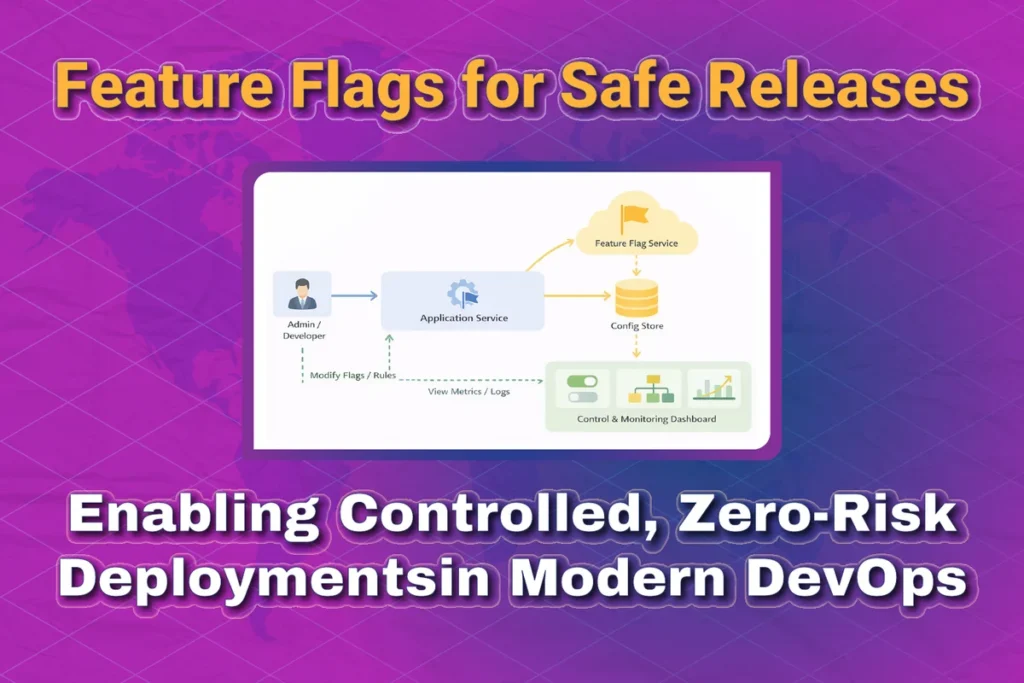
Feature Flag Architecture Overview
A typical feature flag architecture includes:
- Application services
- Feature flag SDK
- Feature flag service or config store
- Admin or control dashboard
The application queries the feature flag service at runtime to decide which code path to execute.

Types of Feature Flags
1. Release Flags
Used to control the rollout of new features.
- Short-lived
- Removed after the feature is fully released
- Common in CI/CD pipelines
Example:
- Enable checkout redesign for production after validation
2. Experimentation Flags
Used for A/B testing and experiments.
- Compare multiple versions
- Measure metrics like conversion rate or latency
- Often integrated with analytics tools
Example:
- Show new UI to 10% of users
3. Operational Flags
Used to control operational behaviour.
- Kill switches
- Rate limiting
- Performance tuning
Example:
- Disable recommendation engine during high load
4. Permission Flags
Used to enable features for specific users or roles.
- Internal users
- Beta testers
- Premium customers
Example:
- Enable advanced analytics for paid users only
Feature Flags in CI/CD Pipelines
Feature flags fit naturally into modern CI/CD workflows.
Traditional CI/CD Flow
- Code commit
- Build
- Test
- Deploy
- Feature exposed to all users
CI/CD with Feature Flags
- Code commit
- Build
- Test
- Deploy (feature disabled)
- Gradual enablement
- Monitor metrics
- Full rollout or rollback
This separation drastically reduces deployment risk.

Feature Flags and Safe Releases
Feature flags enable multiple safe release strategies:
Progressive Rollouts
Gradually enable features for increasing percentages of users.
- 5% → 25% → 50% → 100%
- Monitor metrics at each stage
Instant Rollbacks
If an issue is detected:
- Disable the flag
- No rollback deployment needed
- Downtime avoided
Dark Launches
Deploy features without user visibility.
- Feature runs in production
- Users don’t see it
- Helps validate performance and stability
Feature Flags vs Blue-Green & Canary Deployments
Feature flags complement deployment strategies rather than replacing them.
| Strategy | Focus |
| Blue-Green | Infrastructure switching |
| Canary | Traffic splitting |
| Feature Flags | Runtime behaviour control |
Best practice: Use feature flags together with Canary or Blue-Green deployments for maximum safety.
Feature Flag Management Tools
Popular feature flag tools include:
- LaunchDarkly
- Split.io
- Unleash
- Flagsmith
- AWS AppConfig
- Azure App Configuration
These tools provide:
- UI dashboards
- SDKs
- Targeting rules
- Audit logs
- Metrics integration
Feature Flags in Microservices
In microservice architectures, feature flags become even more valuable.
Challenges addressed:
- Independent service deployments
- Partial rollouts
- Backward compatibility
Best practices:
- Centralised flag management
- Consistent naming conventions
- Avoid cross-service flag dependencies
Best Practices for Feature Flags
1. Use Clear Naming
Bad:
- flag1
- new_feature
Good:
- checkout_v2_enabled
- enable_payment_retry
2. Clean Up Old Flags
- Remove stale flags
- Avoid technical debt
- Track flag lifecycle
3. Default to Safe Behaviour
- Fail closed for risky features
- Ensure predictable defaults
4. Monitor Everything
Track:
- Error rates
- Performance
- User behaviour
5. Secure Flag Access
- Role-based access control
- Audit changes
- Avoid exposing flags to unauthorised users
Common Anti-Patterns
- Too many permanent flags
- Hardcoding flag values
- Flags without documentation
- Flags controlling critical security logic
Feature Flags and Observability
Feature flags should integrate with:
- Monitoring (Prometheus, CloudWatch)
- Logging (ELK stack)
- Tracing (Jaeger, OpenTelemetry)
This ensures full visibility into how flags impact system behaviour.
Real-World Use Cases
E-commerce
- Gradual rollout of new checkout flow
- Disable promotions instantly if issues arise
FinTech
- Enable new transaction rules selectively
- Roll back risky logic instantly
SaaS Platforms
- Beta feature access
- Tier-based feature enablement
Feature Flags and Agile Development
Feature flags align perfectly with Agile principles:
- Continuous delivery
- Incremental development
- Faster feedback loops
- Reduced fear of deployment
Teams can merge unfinished features safely without exposing them.
Security Considerations
- Never expose sensitive logic via client-side flags
- Encrypt flag data
- Validate flag sources
Feature Flag Lifecycle
- Create a flag
- Deploy code
- Enable for internal users
- Gradual rollout
- Full release
- Remove flag
Managing this lifecycle is critical for long-term maintainability.
Key Takeaways
- Feature flags decouple deployment from release
- Enable safer, faster, and controlled releases
- Reduce downtime and rollback complexity
- Complement Canary and Blue-Green deployments
- Essential for modern DevOps and CI/CD
Conclusion
Feature flags have become a foundational practice in modern DevOps. They empower teams to move fast without breaking things by introducing fine-grained control over feature exposure. When combined with CI/CD pipelines, observability, and progressive delivery strategies, feature flags unlock true continuous delivery.
If your goal is safer releases, faster experimentation, and confident deployments, feature flags are no longer optional—they are essential.
Feature Flags for Safe Releases: FAQs
1. What are Feature Flags?
Feature flags (also called feature toggles) are conditional switches in code that allow developers to turn features on or off at runtime without redeploying the application. They help teams release code safely by controlling feature exposure.
2. How do Feature Flags help in safe releases?
Feature flags decouple deployment from release. Even after deploying code to production, the feature can remain disabled until it is validated, gradually rolled out, or approved—reducing risk and downtime.
3. What is the difference between Feature Flags and Canary Deployment?
- Feature Flags control functionality inside the application.
- Canary Deployment controls traffic routing to different versions of the application.
Feature flags can be used along with canary deployments for even safer rollouts.
4. Can Feature Flags replace Blue-Green deployments?
No. Feature flags complement Blue-Green deployments but do not replace them.
- Blue-Green focuses on infrastructure and environment switching.
- Feature flags focus on application behavior control.
Using both together provides maximum release safety.
5. Are Feature Flags only for large teams?
Not at all. Feature flags are useful for:
- Startups releasing fast
- Small teams experimenting safely
- Enterprises managing complex rollouts
Any team practicing CI/CD can benefit from feature flags.
6. Do Feature Flags affect application performance?
If implemented correctly, the performance impact is minimal. Best practices include:
- Caching flag values
- Avoiding excessive flag checks in hot paths
- Cleaning up unused flags regularly
7. What happens if a feature causes issues in production?
One of the biggest advantages of feature flags is instant rollback.
You can disable the feature immediately from the flag dashboard—no redeployment required.
8. How long should Feature Flags be kept in code?
Feature flags should be:
- Temporary for releases
- Removed once the feature is stable
Keeping old flags increases technical debt and code complexity.
9. Can Feature Flags be managed without redeployment?
Yes. Feature flags are usually managed through:
- Feature flag services
- Configuration stores
- Admin dashboards
Changes take effect immediately or within seconds.
10. What are popular Feature Flag tools?
Some widely used feature flag tools include:
- LaunchDarkly
- Split
- Unleash
- Flagsmith
- AWS AppConfig
You can also build a simple custom feature flag system if needed.
11. Are Feature Flags safe for production use?
Yes, when used properly. In fact, many large companies rely on feature flags for:
- Gradual rollouts
- A/B testing
- Kill switches
- Dark launches
12. Can Feature Flags be used with CI/CD pipelines?
Absolutely. Feature flags fit perfectly into CI/CD by:
- Deploying code with features disabled
- Enabling features after validation
- Supporting progressive delivery strategies
13. What is a Kill Switch in Feature Flags?
A kill switch is a type of feature flag that allows teams to instantly disable a feature if something goes wrong in production, ensuring system stability.
14. Are Feature Flags suitable for microservices?
Yes. Feature flags work well in microservices architectures, especially when combined with centralized flag management and consistent rollout strategies.
15. What are common mistakes when using Feature Flags?
Common mistakes include:
- Leaving flags in code forever
- Poor naming conventions
- No ownership for flag cleanup
- Using flags for permanent configuration
Proper governance avoids these issues.